Praxion is the governor of your Postgres
that runs inside your own network.

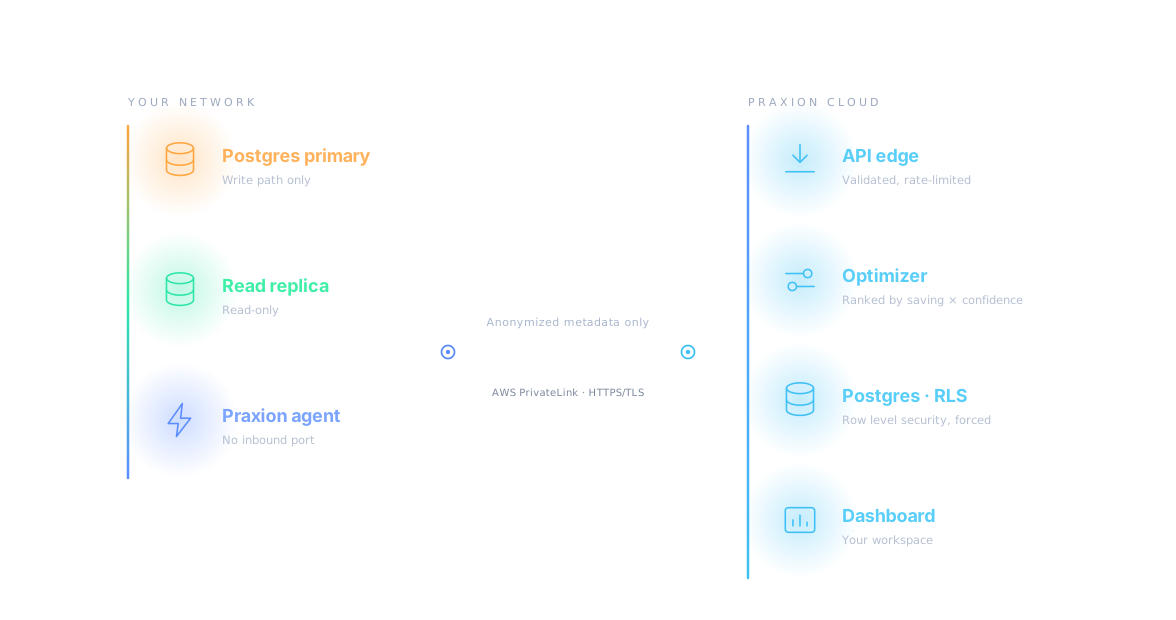
Praxion runs a small agent inside your own network. It reads pg_stat_statements from your Postgres replica, anonymizes the queries, and sends metadata only — your table data never leaves. Suggestions arrive ranked by predicted saving × confidence, and nothing reaches your database unless you apply it. Plain-language questions are answered from your own business glossary.

One agent.
Inside your network. No VPN.

The agent runs on a host you control and opens its connections outwards — nothing ever reaches in. It reads your Postgres replica — never the primary — via pg_stat_statements, anonymizes the queries and sends metadata only. It reaches the control plane over HTTPS/TLS, or over AWS PrivateLink on Enterprise. If the connection drops, the agent keeps running and keeps its readings until it can send them.

01
Deploy it yourself, in minutes
Pull the container — ghcr.io/phjcherry/praxion-agent — or drop in the signed native binary for Windows, macOS or Linux. Both take the same four settings: AGENT_ID, LICENSE_KEY, CONTROL_PLANE_URL and PG_REPLICA_DSN. Nothing is installed on anyone's laptop.
02
Reads the replica, never the primary
The agent only observes and only against a read-only replica. Suggestions are raised with the DDL attached; your DBA reviews them and either copies that DDL into a pull request or applies it through the API. Praxion never sends DROP INDEX foo to your database on its own.
03
Metadata leaves. Your rows do not.
What crosses is an anonymized query fingerprint, its timings and the catalog metadata that draws the schema map. What never crosses is row values — and the host and database names, which are fingerprinted on arrival with the originals discarded.
04
Heartbeats that detect silence
An agent is counted as running only if it reported in the last 90 seconds — so a stopped process or a blocked outbound connection reads as exactly that, not as a healthy agent with nothing to say. The agent also honours the rate limiter's Retry-After instead of hammering.
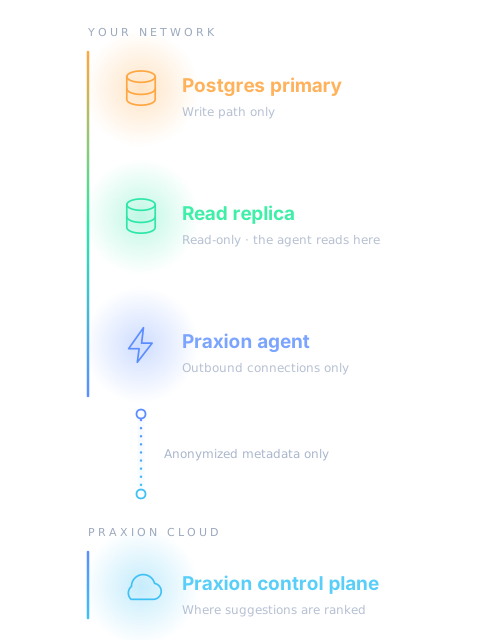
Postgres primary and read replica sit with the Praxion agent inside your network. The agent opens outbound connections only and sends anonymized metadata to the Praxion control plane.

Anchored to your query log.
Ranked by saving × confidence.

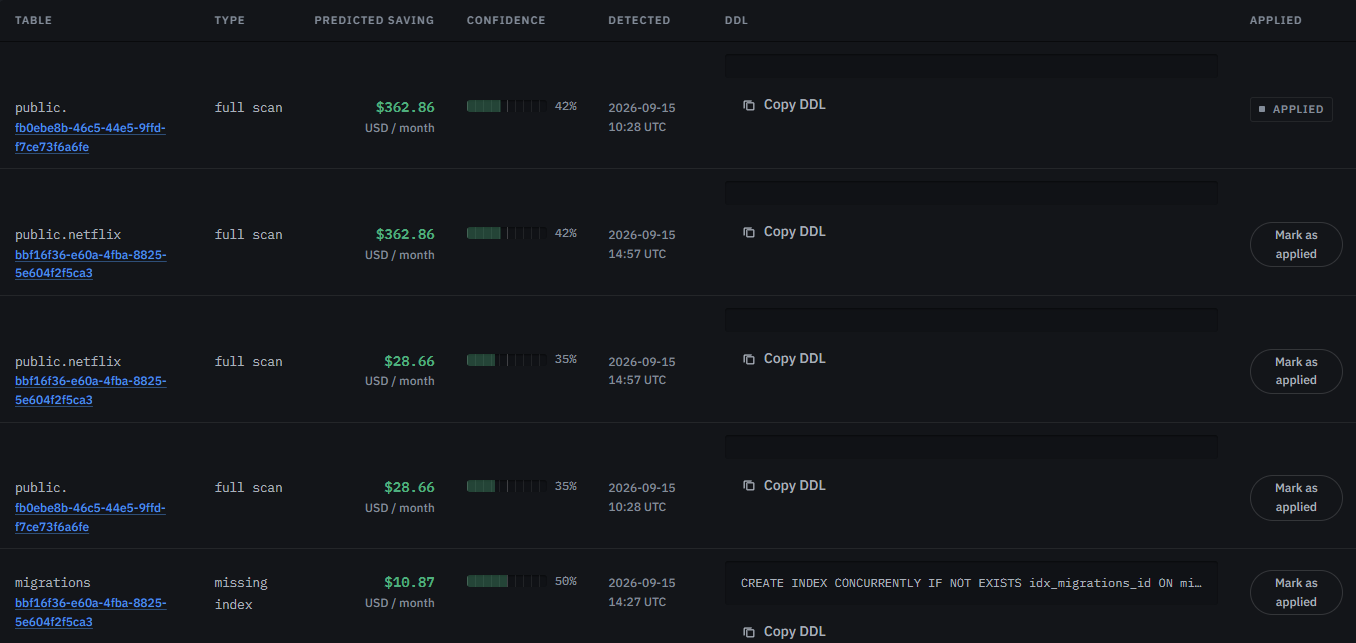
The agent reads pg_stat_statements and raises only what it can actually see there: full scans and missing indexes. Each suggestion carries the table it touches, the money it is predicted to be wasting per month, a confidence score, and the DDL to fix it. The list is ordered by saving × confidence — so a 35% guess sorts below a 60% one, where it belongs.

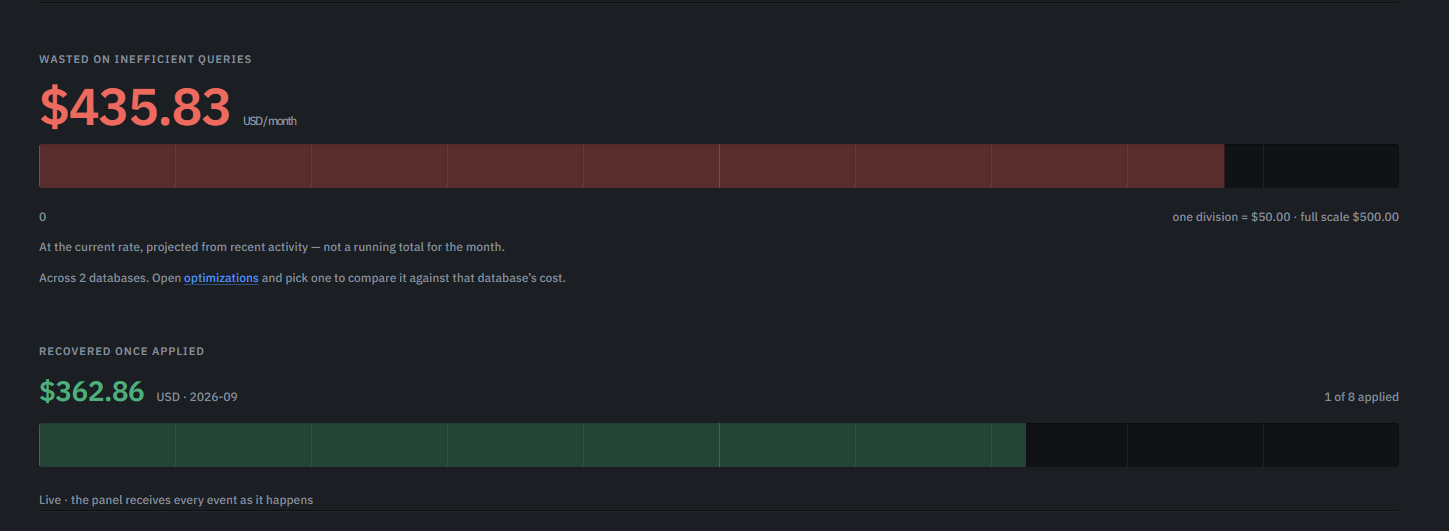
Praxion's panel: $435.83 per month wasted on inefficient queries, projected from recent activity, across 2 databases — and $362.86 recovered once applied, with 1 of 8 suggestions applied.
Real in-app screenshot
Praxion's suggestions table: table, type, predicted saving, confidence, detected, DDL and applied state for each finding — public.netflix, migrations and public.customers, with $362.86 and $28.66 a month of predicted saving.
Real in-app screenshot

Ask in plain language.
See the SQL before it runs.

Write the question the way you would ask a colleague. Praxion translates it using your glossary definitions rather than whatever the model assumes, validates the indexes it wants to use against the real schema, and shows you the SQL before anything runs. Each step of the pipeline is reported to the panel as it completes.

Guardrail 1
The SQL is printed before anything runs — you read it before your database does.
Guardrail 2
Every business term resolves through your glossary, so "active customer" means what your company says it means.
question natural language
"give me the 10 customers with the most revenue in the last quarter, excluding the ones marked as churned, and also show how many orders they placed."
pipeline step 4 / 4
  1. ✓intent parsed — 3 clauses, 1 exclusion12 ms
  2. ✓schema mapped — public.customers ⋈ public.orders38 ms
  3. ✓SQL generated — 4 candidate indexes checked61 ms
  4. ▸executing read-only — rows streaming in412 ms
glossary applied 3 / 4 resolved
✓"active customer" → customers.status
✓"revenue" → SUM(orders.total)
✓idx_customers_status verified against the live schema
!"churn window" has no definition yet — add it to the glossary
generated sql Copy Explain Run
-- candidates: idx_c11a, idx_customers_status SELECT c.id, c.name, SUM(o.total) AS revenue, COUNT(o.id) AS order_count FROM customers c JOIN orders o ON o.customer_id = c.id WHERE c.status != 'churned' AND o.created_at >= now() - INTERVAL '90 days' GROUP BY c.id, c.name ORDER BY revenue DESC LIMIT 10;
result 4 rows · 412 ms
c.idnamerevenueorders
c-00412Northframe BV$42,11838
c-00923Lattice Labs$31,42029
c-01145Vortexo GmbH$28,90141
c-00388Meridian SA$26,11822

Your network, your rules. None of ours.

The only data that crosses the boundary is anonymized metadata: query fingerprints, their timings, and the catalog snapshot the schema map is drawn from. Never row values, never credentials. The control plane never touches your database, and your database never exposes itself to the control plane. Enterprise connects over AWS PrivateLink; Starter and Growth use HTTPS/TLS to the same API.

Three things run inside your network: the Postgres primary, a read-only replica and the Praxion agent. The agent sends anonymized metadata out to the Praxion cloud, where the API edge, the optimizer, Postgres with row level security and the dashboard sit.

You pay per connected database,
not per seat.

Every plan is billed per connected database, per month — no query metering, no seat licensing and no surprise overage invoices. Start on the 15-day trial — 1 database and 75 Text-to-SQL queries — then move to Starter (up to 2 databases at $149 each) or Growth (up to 10 at $169 each). Enterprise is negotiated from ~$99 per database on a minimum commitment.

15 day trial
Free
1 database · 75 trial queries
Optimization engine (OPTIMIZE) — missing-index and costly-query detection, with mandatory human approval before any change is applied
Visual schema map (VISUALIZE), with tables colored by estimated spend
Text to SQL — 75 trial queries
1 dashboard user
Email/chat support
Starter
$149/db/mo
Up to 2 databases · 200 AI queries
Optimization engine (OPTIMIZE) — missing-index and costly-query detection, with mandatory human approval before any change is applied
Visual schema map (VISUALIZE), with tables colored by estimated spend
Text to SQL — 200 queries included per month
Unlimited dashboard users, with permissions by role (viewer, optimizer, admin, auditor, billing)
Email/chat support
Growth
$169/db/mo
Up to 10 databases · role-based access
Everything in Starter
Your own business glossary for Text to SQL — define what "active customer" or other company-specific terms mean
CI/CD integration — automatically blocks dangerous SQL migrations before they reach production
Up to 10 dashboard users, with permissions by role (viewer, optimizer, admin, auditor, billing)
Text to SQL — 1,000 queries included per month
Priority support
Starter → Growth: automatic data migration · keep your fingerprints · keep your active rules Questions about billing? Talk to sales →

What people
want to know first.

If it's not here, write to us at support@praxionapp.com — real humans reply, usually within one business day.

What if Praxion goes down?
+
The agent keeps running and keeps its readings on the host. When the connection comes back they drain in order. The dashboard may be down — your database never notices.
What exactly leaves my network?
+
An anonymized query fingerprint, its timings (p50/p95/p99), and the catalog metadata the schema map is drawn from. Row values never leave. Neither does the host name or the database name: both are fingerprinted on arrival and the originals are discarded.
What if a suggestion is wrong?
+
Nothing is applied to your database by Praxion. Each suggestion carries a predicted saving and a confidence score, so a 35% estimate never reads like a certainty. You review the DDL and either copy it into a pull request or apply it through the API — and every change you make lands in the audit log.
How does it compare to raw pgwatch / pg_stat_statements?
+
pg_stat_statements tells you what ran and how long it took. Praxion reads it from your replica and turns it into a ranked list of suggestions with a predicted saving in dollars, a confidence score and the DDL to copy. The diagnosis is the same signal — what changes is the triage.
Doesn't Text-to-SQL introduce risk?
+
Three reasons it does not: the SQL is printed before anything runs, every business term resolves through your glossary instead of the model's assumptions, and the indexes the query wants to use are validated against the real schema. Every generated query is also recorded as an event in the audit log.
Why AWS PrivateLink and not just HTTPS?
+
PrivateLink keeps the agent's connection off the public internet — no public hostname, no IP allowlists — which is what a PCI- or HIPAA-type review tends to ask for. It is Enterprise-only and not self-serve: we provision a VPC endpoint service against your AWS account first, and only then does a private DNS name exist for the agent's CONTROL_PLANE_URL. Starter and Growth reach the same API over HTTPS/TLS. Either way, your table data never leaves your network.
Can I run more than one agent?
+
Yes — one per host or replica. Each database you register is attached to an agent, and the Agents screen shows what each one is able to do. You can revoke an agent's credentials from there at any time and its next request is refused — but revoking cannot be undone and does not stop the process. You stop that where it runs.

Postgres performance,
explained.

Field notes on pg_stat_statements, query optimization, and running guardrailed Text-to-SQL on-prem. Written by the engineers who build Praxion.

View all articles →